
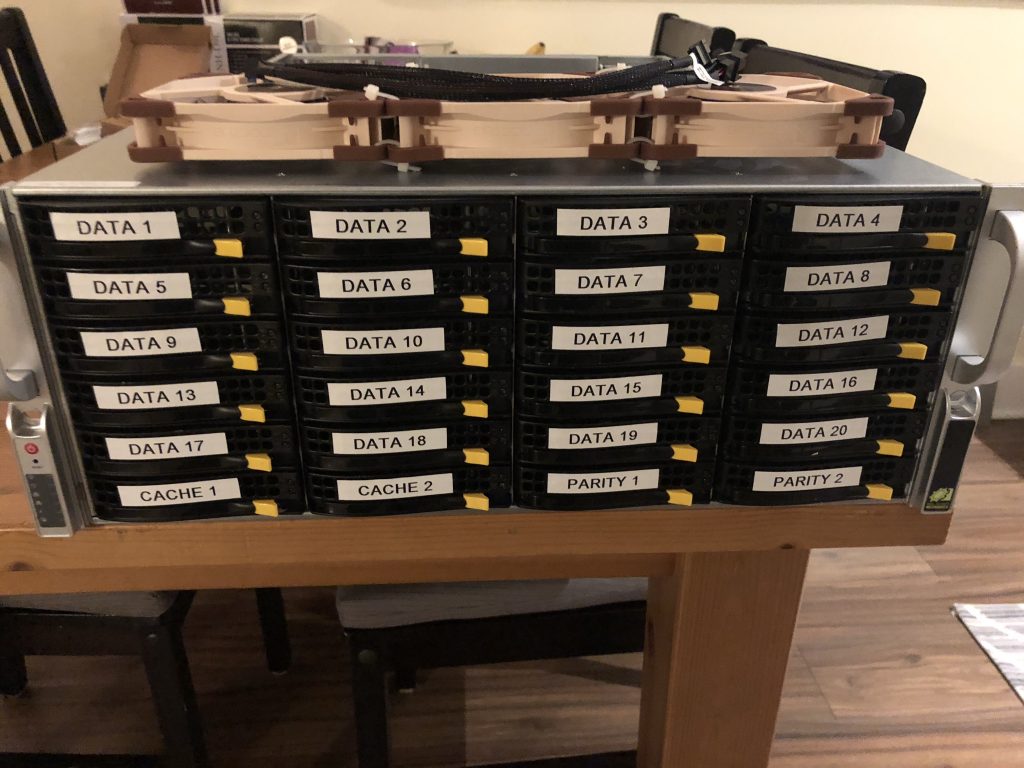
I’ve been using a Dell R510 with unRAID and Docker for almost three years. It might be time for a change. Here’s the solution.
I’ve been writing what is now a three-part series covering the history of my homelab and some the issues I’d been experiencing lately with my unRAID/Dell R510 combo. To recap, although the setup was reliable for the better part of three years I had been looking for a solution to the following issues I was facing:
- I’m almost out of storage space again – with every bay populated in the R510 unRAID is reporting out 96.1/104 TB used. At my current growth rate I’ve got about six months to figure this out.
- unRAID is slow – like, really slow. Parity is calculated in real-time but the drives aren’t striped. They’re simply XFS formatted devices consolidated to a single mountpoint – much like MergerFS. This wasn’t so much of an issue at the beginning but I notice now if there are multiple Plex streams on the go and I try to copy some files from my desktop to the server the whole thing just about comes crashing down. This needs to change – I need some high performance storage.
- The R510’s dual X5650s are showing their age – I routinely see the CPUs nearly maxed out during “prime time”. I think hardware transcoding might be the solution, but either way it’s time for more horsepower.
- While I don’t backup my downloaded media files (I can get them back – if some are missing, I don’t really care) I do care very much about my personal irreplaceable data. This means I have backups of my unRAID files, VMs and Docker Containers running as often as I can – in this case nightly. What I don’t like about unRAID is that you need to stop the VMs and containers to do a proper backup. I’ve got 20+ containers and a ton of Plex metadata so backups now take almost three hours a night to complete. This means my uptime is literally only 21 hours/day by default. This does happen during the middle of the night, but I think I can do better. Once or twice I’ve been watching something on Plex very late at night and had the stream cut out because backups were triggered and was super disappointed in my setup when it happened.
THE TIME IS HERE – THE SOLUTION – A NEW SUPERMICRO!
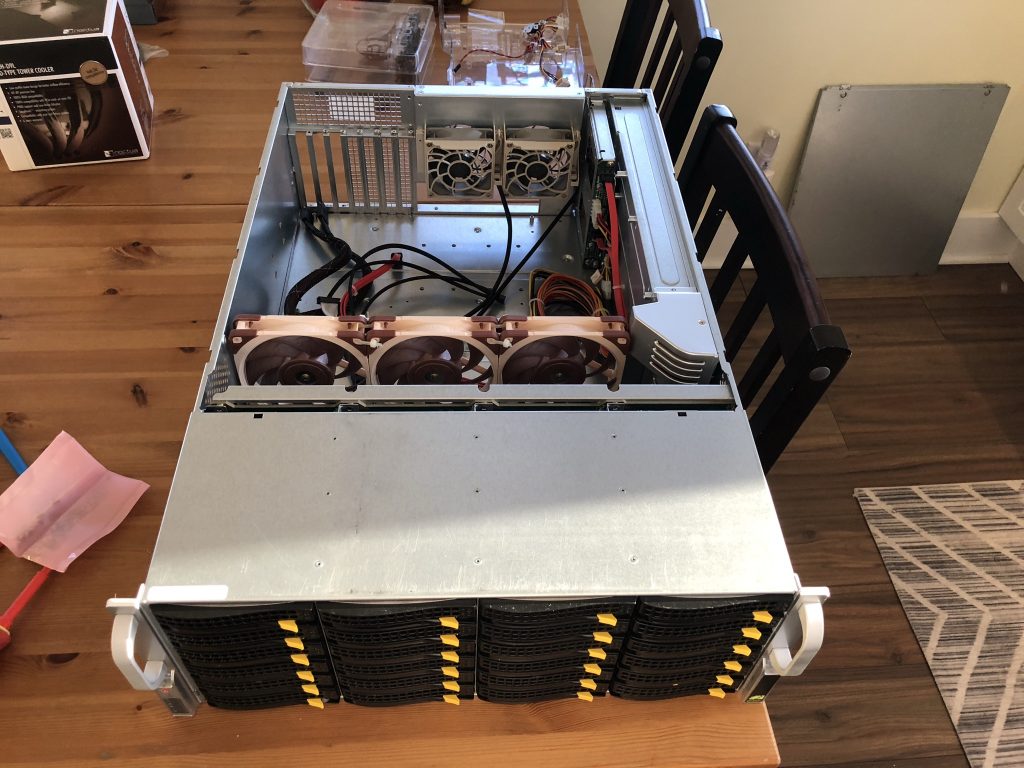
First, the fun part – the specs:
- Supermicro CSE-846BE16-R1K28B 4U Server Chassis
- 2x1280W SQ PSUs
- BPN-SAS2-846EL1 Backplane
- LSI 9207-8i HBA
- GIGABYTE B560 AORUS PRO AX LGA 1200 Motherboard
- Timetec Hynix IC 16GB DDR4 2133MHz Memory
- 2 x Western Digital WD Blue 500GB SN550 M.2 NVMe
- Intel Core i5-10400 Comet Lake 6-Core 2.9 GHz CPU
- Noctua NH-D9L CPU Cooler
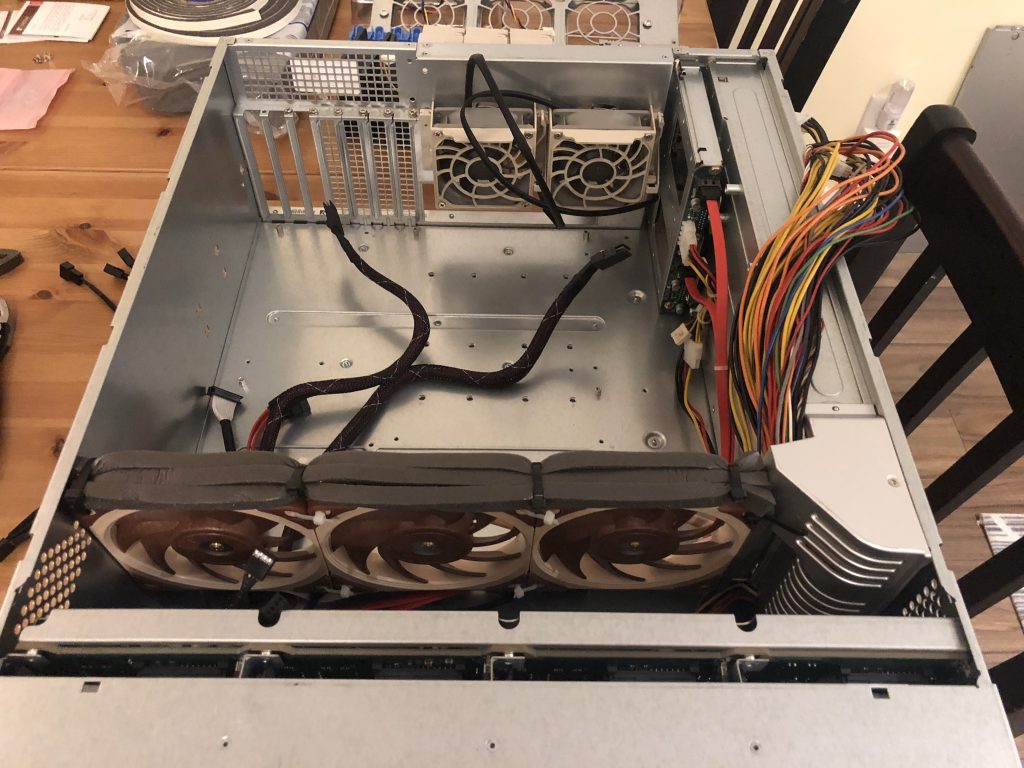
- 3 x Noctua NF-A12x25 PWM (Fan Wall Replacement)
- 2 x Noctua NF-R8 redux-1800 PWM (Back Fan Replacement)
Here’s the twist – despite everything I had written in my last post I ultimately decided that this server should continue to run unRAID. You might also be wondering why I chose a relatively small amount of memory (16GB) and an i5. I’ve decided to let unRAID do what it does best and be a dedicated media server in my rack. I’ll be building up a second whitebox server soon to take over virtualization duties but for now my old R510 is taking on the VMs.
Items that will run in Docker on the new dedicated media server:
- Plex
- Tautulli
- Lidarr
- Sonarr
- Radarr
- Deluge
- Jackett
- Ombi
I’ve also decided to move my “high availability” services to the cloud GASP. More on that later, but essentially I’ve spun up a Ubuntu VPS on Digital Ocean with Docker Compose and am running the following there:
- WordPress (this blog)
- Unifi Controller
- UNMS Controller
- BitwardenRS
- Nextcloud
I’ve addressed my storage capacity issues by moving from a 12 bay to a 24 bay enclosure – I figure this chassis will take me to about 180TB usable. By keeping the docker containers and their appdata on an NVMe SSD I’ve seen Plex operations speed up significantly – specifically thumbnail loading time while browsing libraries. The i5-10400 has Intel UDH 630 graphics onboard allowing Plex to do hardware transcoding without utilizing regular CPU capacity. Suffice to say, while this isn’t an overly powerful processor compared to some of the Ryzen chips on the market, it can easily handle 20+ simultaneous 1080p transcodes. There’s an impressive amount of information over at serverbuilds.net on Intel QuickSync hardware transcoding that I’d highly recommend checking out.
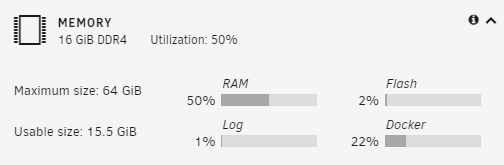
As for the earlier memory comment, since this server will only be running media server duties in Docker I can get away with 16GB of memory without breaking a sweat. At time of writing the server has been online for a month straight and is reporting out ~ 50% utilization.
unRAID 6.9 and Multiple Cache Pools
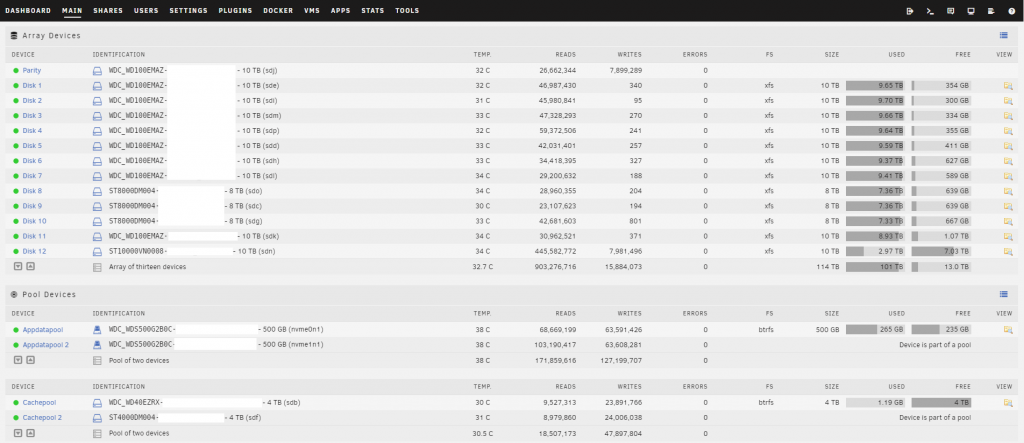
unRAID has been busy and with their release of 6.9 stable have addressed on of my other main concerns with the OS – having faster “tiered” storage available. I can now have a large bulk storage array for media and other “write one read many” data and multiple “cache pools” for other tiers of data. I’m currently running a 2 x 4 TB HDD BTRFS cache pool as a downloads scratch drive and 2 x 500GB SSD BTRFS cache pool for Docker appdata. By staying with unRAID I’ve also retained the ability to grow storage one drive at a time and simply add to my existing array which was important to me. By using multiple cache pools to create a middle tier of storage with HDDs in RAID 1/10 I’ve also got access to reasonably quick storage that can grow later making the new setup a win-win. Cool!
This addressed my issues with extended backup times too – I’m now only backing up media appdata as I’ve offloaded VMs to another server. This means I’m now comfortable with weekly vs. nightly backups. I utilize the RAID 1 BTRFS HDD mirror as a cache to write the backup to initially which has reduced the total weekly backup time to about 25 minutes. Once the containers are started up again the unRAID mover puts the backups files on the main array.
Oh, I also took the opportunity to add a 10GBe NIC to the new server and connect it up to my Aruba switch – now I just need to do the same on my desktop..
A Note on Noise…
If your server rack is anywhere near your living space you likely know too well the struggles of using enterprise gear at home. The R510 I had been using as my primary server for the last few years was reasonably quiet but on the upper end of what I’d consider to be tolerable with my home office being literally on the other side of the drywall behind my rack.
There are some great guides online outlining how to retrofit the Supermicro 846 with Noctua fans and I’m happy to report that the mods have gone incredibly well. The build is almost silent and even under load drive temperatures have been comparable to the R510.
While I didn’t follow it anywhere close to the letter I wanted to give a shout out to Jason Rose for his incredibly in depth write-up on his blog.
This has made me change my tune on server hardware moving forward – I’ll be going with another whitebox build when it’s time to upgrade my virtualization server.
That’s all for now folks! Stay tuned for more on the new virtualization server, a look at my Digital Ocean “high availability” VPS and some Unifi Protect video content soon.

 Brown.id